You can reset your password at any time by visiting login.horizonpower.com.au/reset-forgotten-password
We’ll need to confirm it’s you by sending a one-time code to your registered email address or mobile number.
We’ll need to confirm it’s you by sending a one-time code to your registered email address or mobile number.
Yes. You can submit a request to update your contact information, including your email address and phone number, in the Account Details section of MyAccount.
After you register and log in with one of your accounts, you can link your other accounts in the Account Details section of MyAccount. To do this you’ll need your other account numbers handy, and the account name exactly as it appears on your bill.
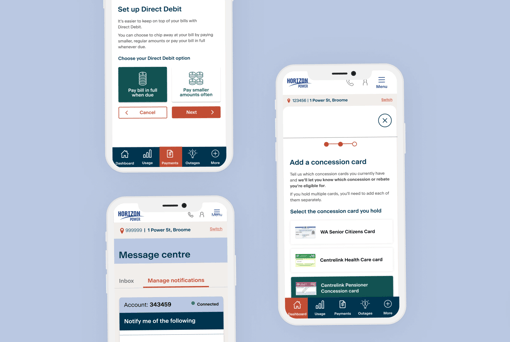
Yes, we can notify you when your bill or direct debit payment is due and if your estimated energy charges reach a set amount. Visit the Message Centre in MyAccount to manage your notification preferences and view your notification history.
If you are a residential customer, you can add your concession cards to your account using the Concessions & Rebates form located on the Dashboard. We’ll let you know which concessions you may be eligible for and how much you are likely to receive.
If you hold multiple cards, you'll need to add each of them separately.
If you hold multiple cards, you'll need to add each of them separately.
Visit the Help Centre in MyAccount and complete the online form to let us know if you’re moving in or out of a property.
Visit the Account Details section of MyAccount to view the account details, including supply address, electricity tariff, meter number/s and any rebates or subsidies you are receiving.